| Flash! Is it right for YOUR web site? |
Depending
on the content and purpose of a web site, the dynamic and sometimes
interactive
nature of a Flash animation can enhance and captivate the viewer
- or - it can turn them away with long download times; the need
for the plug-in; and/or a road-block to the inner content of
a site.
This animation program has plenty to offer,
and although it takes some effort to become comfortable with
the interface,
once
the basics are mastered, anyone can start to create Flash movies.
Starting
with simple time-line movement, one can advance to creating
action scripted content. No need to hand code - the
action script
panel gives the designer a multitude of available actions
at the click of a mouse.
It is becoming more common to see
entire sites created with Flash. Unlike HTML pages, (and browsers
different interpretations
of
HTML) this
format gives the designer greater control over the visual
effect of the final web page.
Used judiciously, and with
good reason, a Flash animation can greatly enhance a site. |
To Flash or not.. |
Pro's
- Add interactivity..
- Create games..
- Use instead of HTML..
- Design education tools..
- “Cool” and fun animations can add spice to
your site
|
Con's
- Viewer needs plug-in
- Why.. Just because its possible..?
- Steep learning curve
- May need non-flash alternate site
- Flash intro pages can turn viewers away
|
|
- If you add any Flash to
your site, make sure you provide a link to Macromedia
to download the plug-in.
AND/OR..
- Have a Flash detection script and set it up to redirect
to an alternate "non-Flash" page if nessesary.
- Most new computers come with the Flash plug-in, but many
older ones don’t have it. Don't assume everyone has
it.
|
Ways to use Flash:
A "Splash" page before entering the main HTML site
A slide show - good for pictures and art exibits. Viewer can zoom
in on image
Entire site created with Flash, with interactive links
A learning tool. Create interactive
quizzes or
lectures
Product demos, can burn CD's with own stand-alone player
Pop-ups, advertising etc.. |
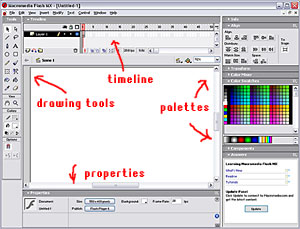
THE FLASH
INTERFACE (default)
- Center is the "stage"
- Drawing tool (left top)
- The Timeline (top) shows each "frame"
- Palettes (right) Colors, Transform, Align, Components, etc..
- Properties - tool - specific
- Library (floating) hold images and content, movie clips etc.
- Action Script panel (floating) |
|
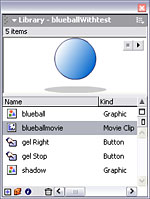
The library, contains the graphics, movie clips etc.
To use an element, it must be converted
to a symbol
It will be in the library, and can be added to the stage
as an "Instance" as often as needed without increasing file size. |
 |
Types of Symbols:
- Movie clips - for animations, or movie
clips within movieclips, etc.
- Button - for interaction, such as links
etc.
- Graphic - similar to movie clip.
|
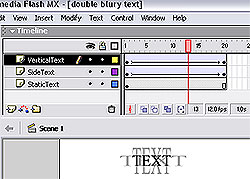
The Timeline
showing layers, and tweened frames
See
it live.. 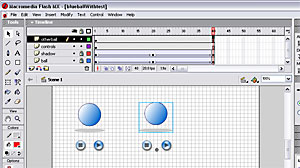 |
The timeline shows each frame.
The Frames-per-second can be set - best is 20 fps, 12fps is jerky,
25fps is smoother, but creates a larger file size. |
In the Timeline:
- Blank Keyframe = no content
- Gray Keyframe =
has content
- Frames further down will take property of previous
frame
- Have each element on its own layer
- Keep Actions
on their own layer on top
- Can lock layers not being worked on
- View or
hide
|
To create a simple motion tween:
- Select first frame and place element
on stage
- Convert to symbol
- Place a keyframe down the line
- Make change to either frame
- Right-click in timeline - select "create motion tween", Flash will build all the "in-between" fames
|
Slide Shows
- Best format to import images: jpeg, Gif, Png
(Flash will import a whole sequence of images if they are named
sequentionally, and place them on individual frames)
- Optimise images in an image editor (Photoshop etc.)
- By default Flash will compress, but its better to override
each image's compression settings
- Alternatively, use the "load movie" action
to load images only when needed
Below:
Example of a slide-show file showing seperate layers for
paintings, titles, buttons and the Actionscript with the "stop"
action showing in the Actions panel |
See
it live... 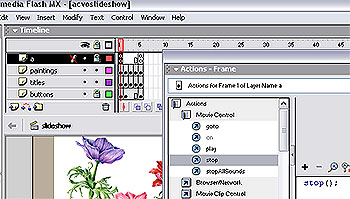 |
More about images..
- Don't scale bitmaps!
- In Alpha settings use 99% and 1% instead of 100$ and 0%
- Use whole numbers
- Scale in increments of 12
- Turn OFF "smoothing" (In image properties
in the library
|
Below:
Text animation:
Simple Flash text animations can add interest to links
Example of a text "fade" (This is set to repeat, but a "stop" action
could be added. Then a roll-over effect could activate it) |
|
File size and preview
- Control/enter plays the movie
- Flash can preview download times - set the connection speed
- Can also preview a preloader
|
Preloaders
A preloader is a small animation that plays immediately,
and can give visual feedback on the download progress of the main
movie.
When download is complete, the main movie starts.
See: http://www.kirupa.com/developer/mx/percentagepreloader.htm for a tutorial |
Flash detection
Javascript in the HTML of a page can detect whether
the viewer has the Flash plug-in insalled. Find a script that can
be cut/pasted into your page at:
http://www.johngaltstools.com/learn/fp/a003.asp
http://moock.org/webdesign/flash/detection/moockfpi/ |
More tutorials can be found at:
http://www.flashkit.com/tutorials/
http://www.actionscripts.org/tutorials.shtml
http://www.cbtcafe.com/flash/
http://www.echoecho.com/flash.htm http://www.iboost.com/build/software/flash/
http://www.absolutecross.com/tutorials/flash/
http://www.actionscripts.org/tutorials.shtml
http://www.pixeloso.com/
See how the experts work with Flash..!
http://www.pedestriandesign.com/#
http://www.hollisdesign.com/
http://www.thevoid.co.uk/
http://www.e3direktiv.com/v4/start.html
http://www.neostream.com/
http://www.andyfoulds.co.uk/main.html
http://www.engine-design.co.uk/ |
|