Web design: How-to get started, current standards, software tutorials, interactive discussions and help...
DACS
Resource
Center
Ives Manor
(lower level)
198 Main Street Danbury.
For information contact:
Annette van Ommeren
(aka "Anna Collens")
Come to the meeting and/or join the newsletter to be notified of upcoming meetings.
Tables, and Image Slicing.. |
| Tables are used to provide a 'grid'
to contain the elements (text, images etc) on a web page. Table
cells allow precise positioning of content. |
- Tables are divided into Rows & Columns which create “Cells”
- Tables
can be nested – a table within a cell for more control
over positioning.
- Table width can be set to fixed pixel width or
to a fluid “%-of-window” width
- Tables can have outside borders – set to desired pixel
width
- Tables can have background color and/or background image. (in
addition to the content of cells)
|
| Table CELLS |
- Table CELLS can also be set to fixed
pixel width or % of table width.
- Cells can have back ground color and/or background image**
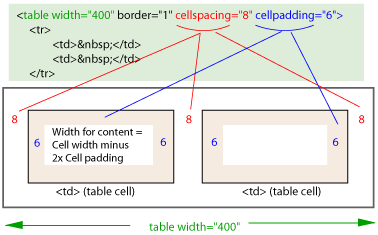
- CELL SPACE = space between each cell.
- CELL PADDING = buffer
between content and edge of a cell
(**Cell BG colors may not be rendered in older versions
of Netscape)
Example (image) of a 2-column table, showing the HTML code: |
|
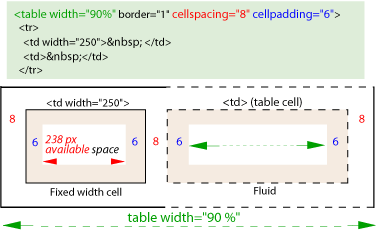
Example (image) of a 2-column "%-based" 2
column table where the left cell is set to a fixed width: |
|
Cells can 'span' multiple columns, and columns
can span rows |
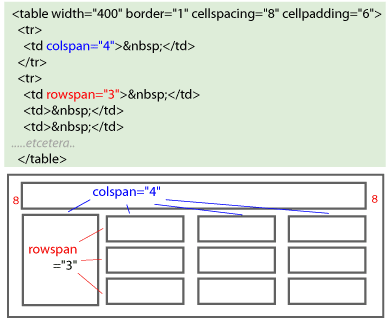 |
Table hints.. |
- To have NO spaces between cells, the ‘cell
spacing’ & ‘padding’ HAS to be set to “0”. (the default is
no-setting-specified)
- Every cell must have some content - either an image, text,
a transparent gif to act as a spacer, or a "non-breaking-space" (" ")
- A "single-pixel-gif" is an tiny transparent gif
(made in an image editor) that can be set to a required size
to 'prop'
open
a cell that may otherwise collapse.
- Instead of regular borders, one can create
a ‘grid’ effect using different table color background
v/s cell color background.
- Or, nesting one table within a larger background-colored
table.
- Beware of Firefox/Netscape - older versions may
not show background color of table, so a colored grid may not
be visible.
|
To ‘help’ Netscape
4x deal with tables:
|
- Make accurate calculations of table/cell
size.
- Specify EVERY cell WIDTH in the HTML!
- Totals of cells and every cell width
between cells must add up!
|
|
See the Links page
for on-line tutorial sites for tables!
|
Next: Cascading Style Sheets. |